Human + AI collaboration

GitHub Copilot Projects vs. Lit Factory

Your whole team. One shared Floor.

Copilot Projects gives you a place to direct parallel agent work. Lit Factory brings people and agents together across the operation. Observe the work, orchestrate decisions and handoffs, and optimize the workflow around your team.

By Lit Factory | Reviewed November 5, 2026

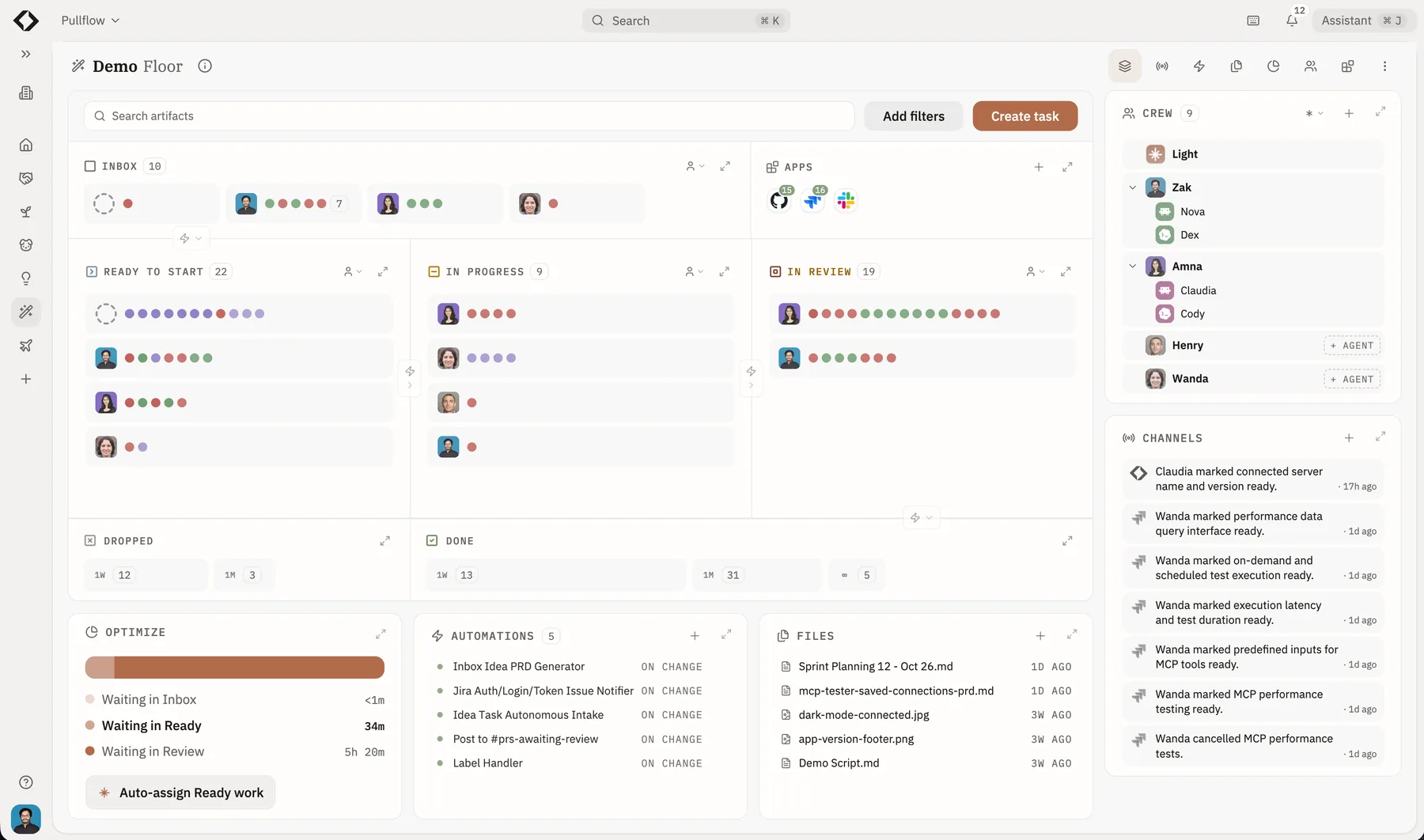
Demo Floor showing human and agent crew, shared work stages, channels, and automations.
A Lit Factory Demo Floor: people, agents, connected work, and workflow signals in one place.

Copilot Projects

Direct work with Copilot.

Give Copilot a goal, supply context, and follow the sessions it coordinates. Choose it when you want to organize execution around Copilot and GitHub.

Explore Copilot Projects

Lit Factory Floors

Run the work together.

Bring product, design, engineering, and their agents onto the same Floor. Give everyone a shared view of ownership, progress, decisions, and the next action across your tools.

Explore the lights-on approach

How Lit Factory works

Coordinate people, agents, and tools from one live Floor.

  1. 01 / Observe

    See what needs attention.

    Follow work across connected tools. See progress, review queues, and handoffs on one live Floor.

  2. 02 / Orchestrate

    Put people and agents in motion.

    Share decisions through the Brain. Choose task autonomy, from working together to independent execution, while developers keep their optimized harnesses.

  3. 03 / Optimize

    Remove the next bottleneck.

    Use delivery metrics to find repeated waits. Optimize suggests automations with a ready-to-build request you can send to Light.

Compare the working models

Look beyond parallel agent sessions.

Ask how the people on your team participate, how decisions reach execution, and how the operation improves. Those are the choices that shape everyday work.

The center of the workspace

GitHub Copilot

Give Copilot a goal. It coordinates sessions, artifacts, and recurring tasks while you track progress and steer the work. Projects can span repositories or work without one.

GitHub: Copilot Projects

Lit Factory

Bring the team onto one Floor. Humans and agents have shared work, ownership, discussions, and decisions across the tools they use. People contribute their own work alongside agents.

See the shared Floor

Observe the operation

GitHub Copilot

The project overview groups agent work into Needs input, Open, Working, and Done. Open a session to inspect its conversation, changes, pull request, and plan.

GitHub: Copilot Projects

Lit Factory

See human and agent work moving through the same stations. Follow ownership, review queues, interruptions, and waiting work across connected systems, with the evidence behind the status.

Run a clear operating review

Orchestrate together

GitHub Copilot

Direct Copilot sessions and use interactive canvases to work with the agent. Repository-scoped canvas extensions and shared automations support team workflows.

GitHub: canvas extensions

Lit Factory

Coordinate a teammate's decision, another person's review, and an agent's implementation on the Floor. Set task responsibility, route clarifications, and keep handoffs attached to the work.

Choose how people and agents collaborate

Optimize the workflow

GitHub Copilot

Automations run from schedules, repository events, or API triggers. Automation groups can use outcomes to propose changes to prompts, tools, and triggers for review.

GitHub: Copilot Automations

Lit Factory

Find where the wider workflow waits. Use delivery metrics, contributions, and planned versus observed autonomy to choose an improvement. Ask Light to build an automation from a prepared request.

Improve how work moves

Connect existing work

GitHub Copilot

Connectors bring services such as Slack and Sentry into Copilot. Projects keep supporting material in a Library; Copilot Memory carries preferences and repository guidance between sessions.

GitHub: connectors

Lit Factory

Keep the Claude Code, Codex, or Cursor environments your developers have configured. Brain connects shared organizational context to work, people, and decisions across the Floor.

Keep your tools and agent environments

See the team at work

Follow a decision all the way through.

A product manager changes the brief. A designer resolves the interaction. An engineer and their agent implement it. A teammate reviews the result. The Floor holds the context and ownership as the work moves between them.

01

See the handoff

Find the owner, the decision, and the work waiting for it. Give the next person or agent the context they need.

02

Coordinate the next move

Resolve a clarification, route a review, or delegate a bounded task. Keep the decision attached to the work.

03

Improve the next cycle

Find a repeated wait in the workflow. Prepare an automation with Light and choose when to put it into operation.

Bring this kind of shared workflow to a demo using your own tools, agents, and acceptance criteria.

Questions from teams evaluating Copilot Projects

How is a Lit Factory Floor different from a Copilot Project?

A Copilot Project organizes ongoing work with Copilot around a goal, including parallel agent sessions. A Lit Factory Floor is a shared operating workspace for a team of humans and agents. It connects their work, ownership, decisions, and context, then uses observation and workflow metrics to guide orchestration and automation.

Does GitHub already support collaboration and automation?

Yes. GitHub supports shared automations, human-agent canvases, connected services, and collaboration around issues and pull requests. Lit Factory brings team participation, mixed-agent work, operational visibility, and workflow improvement together on a shared Floor.

Is this about GitHub Projects or Copilot Projects?

This page compares Projects in the GitHub Copilot app, currently in public preview. GitHub Projects, the planning product with issue and pull-request boards, is a separate product.

Can we keep GitHub and our current coding agents?

Yes. Connect GitHub work to Lit Factory and keep your configured Claude Code, Codex, or Cursor environment. Lit Factory connects the context, ownership, human decisions, and review around that work. This does not require moving your repositories.

What should our team compare in a demo?

Bring one piece of work that needs several people and an agent. Follow a product decision into implementation, route a teammate's review, and inspect where the work waits. Compare what the whole team can see, who can act, what context survives each handoff, and how an improvement becomes an automation.
GitHub sources: GitHub: Copilot Projects | GitHub: canvas extensions | GitHub: Copilot Automations | GitHub: connectors | GitHub: memory and learning

Put your human + AI team on one Floor.

Keep your productive agent setups. Connect the people, decisions, and handoffs around them. See how Lit Factory helps your team observe, orchestrate, and optimize the work together.

Get a Demo

Factory AI vs. Lit Factory

Compare a Droid-centered platform with coordinating the coding-agent environments your teams already use.

Devin vs. Lit Factory

Compare delegated engineering with coordinating your existing people, coding agents, and tools across delivery.

Jira + Rovo vs. Lit Factory

Compare Jira AI and Atlassian Rovo with a shared human + AI workflow across your existing stack. Keep Jira connected.

Linear vs. Lit Factory

Compare product planning with coordinating human + AI delivery. Keep Linear connected or consolidate task management on the Floor.

Herdr vs. Lit Factory

Compare a coding-agent workspace with a shared Floor where people and agents move the work forward together.

View all comparisons →